How to Turn a Hand Sketch Into a Floor Plan
Make a hand sketch convertible, photograph it flat, then trace it to scale in free software, use a redraw service or redraw it with AI. Then check the result.
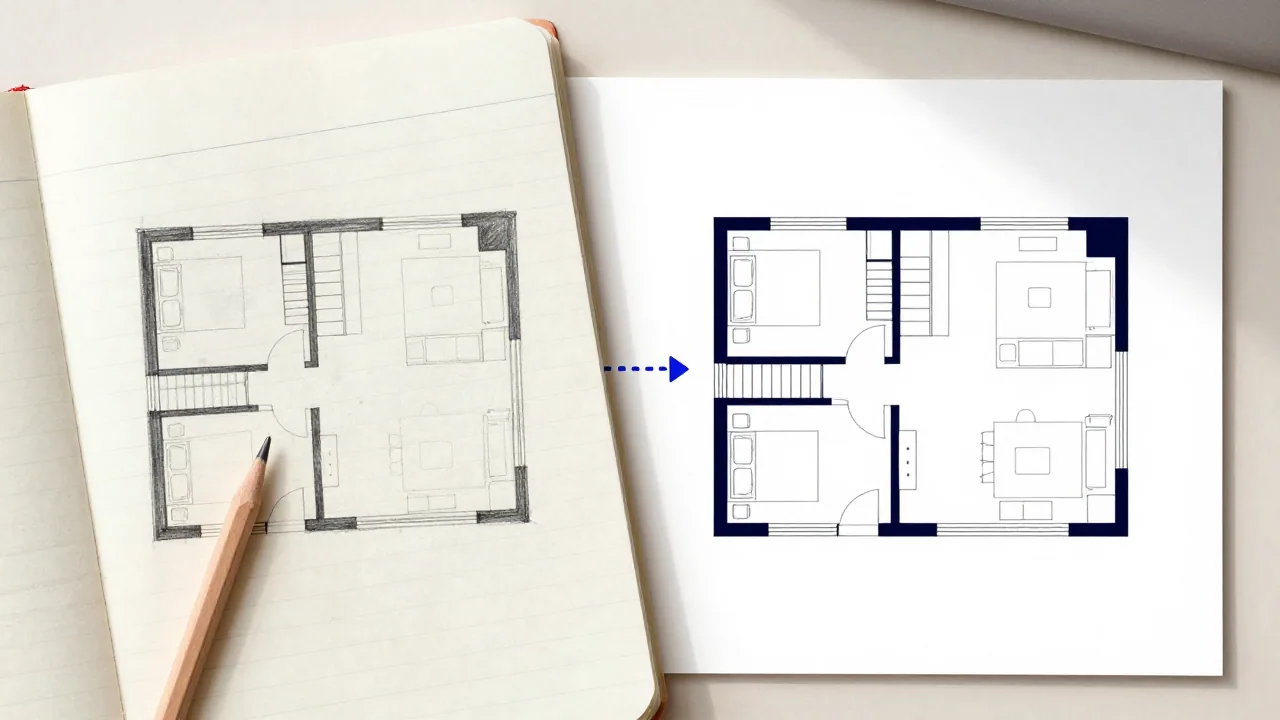
To turn a hand sketch into a floor plan, first make the sketch convertible: closed walls, measured dimensions written on, doors and windows marked, rooms labelled. Then photograph or scan it flat, from directly above, in even light. From there you have three routes: trace it at scale in free software such as Sweet Home 3D, send it to a redraw service, or have an AI tool redraw it as a clean image. Only tracing with your own measurements gives you a plan that is to scale, and whichever route you take, check the result against your sketch.
If you haven't measured or sketched yet, start with how to draw a floor plan. This guide picks up where that one ends: the sketch exists, and you want something cleaner to share, edit or print.
Make the sketch convertible
Every route below, whether a person or software does the work, starts by reading your sketch. The clearer it is, the less gets guessed.
- Closed walls. Each room's outline joins up. A gap should mean an opening, drawn as a door or window.
- Consistent proportions. It needn't be to scale, but a long room should look long. Graph paper helps.
- Dimensions on every wall run, in one unit, plus the overall length and width along two sides. Numbers are what turn a picture into a plan.
- Doors and windows marked with standard symbols: a door leaf with its swing arc, a window as thin lines across the wall. Our floor plan symbols guide shows them.
- Labels inside each room, written horizontally in capitals: KITCHEN, BED 2, WC. Keep text off the wall lines.
- One floor per sheet, with the stairs drawn and an UP arrow.
- Clean line work. Go over the final walls in dark pen, erase construction lines, and redraw rather than cross out.
| Sketch problem | What tends to go wrong |
|---|---|
| A gap where two walls should meet | The room is read as open, or the wall is dropped |
| Writing across a wall line | The text is read as part of the wall, or the wall is broken |
| A crossed-out wall left in | The old wall is kept as a real one |
| No dimensions | Proportions are copied from the drawing, errors included |
| Two floors on one sheet | The floors are merged, or one is ignored |
| Faint pencil on lined paper | Notebook lines are read as walls, and faint walls are missed |
Photograph or scan it well
- Flatten the paper. Folds and curls bend straight walls. Planner 5D's upload guide warns that photos of folded paper plans may not convert well.
- Shoot from directly above, with the phone parallel to the page and the whole sheet in frame. An angled photo turns rectangles into trapezoids; Planner 5D says tilted plans cause problems and doesn't process perspective photos at all.
- Use even light. Daylight from a window, no flash, and no shadow from your hand or phone.
- Maximise contrast: dark ink on white paper. A phone's document-scan mode, or a flatbed scanner, flattens and sharpens in one step.
- Crop and rotate so the drawing fills the frame and the walls run horizontal and vertical.
- Check it at full size. Every number and label should be readable. Then check the upload limits: our tool takes one PNG or JPG up to 10 MB, Sweet Home 3D imports BMP, JPEG, GIF or PNG, and RoomSketcher and Floorplanner take JPG, PNG or PDF.
Route 1: Trace it yourself in free software
Tracing gives you an editable plan that is to scale. You import the photo as a background, tell the software how long one measured wall is, then draw the walls on top.
- Sweet Home 3D is a free, open-source (GPL) desktop program. Use Import background image in the Plan menu, set the scale by moving the ends of a line to a length you know, and choose the origin point. Its user guide calls the image "a helper", which is the right way to treat it.
- Floorplanner runs in the browser and is free for casual use: up to 5 projects, with standard-definition exports (960 × 540 pixels) carrying a watermark and a 10-minute wait between exports. Its help centre describes uploading a JPG, PNG or PDF of a plan and scaling it to real size, without saying whether that needs a paid upgrade. Removing the watermark costs 2 credits per project; 5 credits cost $8.15.
- RoomSketcher lets you import a sketch and trace over it, but only on Pro ($12 a month billed yearly, or $24 monthly) or Team.
The rule while tracing: type your measured lengths; don't follow the pencil. The sketch tells you where walls go, and your numbers tell you how long they are. If the traced outline won't close, a measurement is wrong. Re-measure rather than nudging walls until it fits.
Route 2: Conversion features and redraw services
Some floor plan apps convert an uploaded plan into an editable project automatically. They're built for clean, computer-drawn plans, and their own documentation says so.
| Option | Takes a hand sketch? | Cost (October 2026) | Notes |
|---|---|---|---|
| RoomSketcher AI Convert | No. It works best with clear, computer-drawn plans; RoomSketcher points hand-drawn plans to tracing | First conversion free, then 5 credits; $20 per floor on the free plan | JPG, PNG or PDF in; opens as an editable project |
| Planner 5D plan recognition | No. Its upload guide says not to upload handwritten sketches | Paid plans only: Premium is $19.99/month or $59.99/year | Plans should include dimensions, one floor per image; takes 10 minutes to 24 hours |
| RoomSketcher Order Floor Plans | Yes: a hand-drawn sketch, blueprint or existing plan | $38 per floor pay-as-you-go; from $18 per floor on Pro and Team | JPG, PNG or PDF in; 2D and 3D plans back the next business day |
So for a hand sketch, the automatic converters aren't the route; their vendors send you to tracing or a paid redraw. A redraw service draws what you send, so the numbers on your sketch still decide how good the result is.
Route 3: Redraw it with AI
Our sketch to floor plan tool works differently. You upload one PNG or JPG up to 10 MB and describe what it shows, for example: "Keep every wall where I drew it. Label the rooms as written, straighten the lines, and add dimensions in metres along the outside walls." Choose Trace sketch to keep the drawing as it is, or Add dimensions to have room areas and dimension lines drawn on, then pick one of six styles. You get a clean plan image to download as PNG or PDF.
It redraws; it doesn't measure. The model reads your lines and draws a cleaner picture of them, with no idea of real scale. It can misread a faint line, shift a wall, merge two small rooms or write a dimension that isn't on your sketch, and any number it adds is approximate. That makes it a good fit for showing a layout to a contractor, a designer or a buyer, and a poor fit for anything that has to fit to the centimetre.
If one thing is wrong, describe the correction and run it again, or upload the result to the floor plan editor and describe the change. A GPT Image 2.5 image at 1K costs 12 credits. The 10 welcome credits work only on the Z-Image draft model, which generates from text, so converting a sketch uses purchased credits. Failed renders are refunded.
Common mistakes
- Photographing at an angle, so every rectangle becomes a trapezoid.
- Leaving dimensions off and expecting the tool to know them.
- Leaving crossed-out walls and notebook lines in the image.
- Two floors on one sheet.
- Writing labels along the walls, where they read as lines.
- Following the pencil when tracing, instead of typing the measured length.
- Treating an AI image as a scaled drawing, or copying its dimension labels into a quote or a listing. For listings, see our guide to floor plans for real estate listings.
Check the result
Put the sketch and the result side by side and go through them in this order:
- Rooms. Same number, none merged, none invented.
- Labels. Each room has the name you wrote, in the right place.
- Outline. The exterior shape matches, including notches, bays and recesses.
- Walls. Every interior wall is where you drew it; none added or dropped.
- Doors and windows. Same number, same walls, hinged on the right side, swinging into the right room.
- Stairs. Right position, right direction.
- Dimensions. Every number matches your notes, and the room widths plus the walls add up to the overall size. On a traced plan, measure two walls in the software as a spot check.
- Proportions. A 3 × 4 m room shouldn't look square.
Then read it as a stranger would, with our guide on how to read floor plans. If anything fails, fix the sketch, the trace or the description, and run it again.
Where EZ Floor Planner fits
EZ Floor Planner covers the quick route: upload a photo of your sketch, describe it, and get a clean floor plan image in one of six styles, downloadable as PNG or PDF at 1K or 2K quality. It's useful when what you need is a readable picture of the layout to share.
It doesn't measure, and it doesn't produce a scaled or editable drawing. The image is not to scale, any dimensions in it are approximate, and there's no DXF or DWG export. If you need a plan to scale, trace your sketch with your measurements in drawing software, or pay for a measured drawing.
FAQ
Can AI turn a hand-drawn sketch into a floor plan?
Yes, as an image. Tools like our sketch to floor plan redraw a photo of a sketch as a clean, labelled plan, but they read lines rather than measure, so check every wall and number afterwards. The automatic converters in RoomSketcher and Planner 5D are built for computer-drawn plans and steer hand sketches elsewhere.
What's the best free way to convert a sketch into a floor plan?
Trace it. Sweet Home 3D is free and open source: import the photo as a background image, set the scale from one measured wall, and draw the walls over it using your measurements. Floorplanner, in the browser, is another option; its free tier exports watermarked, low-resolution images.
Will the converted floor plan be to scale?
Only if you trace it with your measurements in drawing software. An AI-redrawn image is not to scale, and its dimensions are approximate even when the layout looks right.
Why did the AI move a wall or rename a room?
Usually because the sketch was ambiguous: a faint or broken line, text over a wall, or a crossed-out wall left in. Clean up the sketch, retake the photo from directly above, and say in your description which walls to keep and what each room is called.
Can I just use a phone photo of my sketch?
Yes, if it's taken flat, from directly above, in even light, and cropped to the drawing. A phone's document-scan mode usually does better than an ordinary photo.